
How to Use Payment References to Avoid Transfer Delays
EXPAT BANKING
Blog > Expat Banking > How to Use Payment References to Avoid Transfer Delays
How to Use Payment References to Avoid Transfer Delays
EXPAT BANKING
BANKEAZ | Expats Team
7/29/2026 - 4 min read


You enter the beneficiary name, account number, amount, and currency. Everything appears ready.
Then you reach a small field marked “reference,” “message,” “purpose,” “communication,” or “payment details.”
It may look optional. In practice, that field can determine whether the recipient knows what the money is for.
A transfer can arrive at the correct bank account but remain unmatched to the correct invoice, student record, tax file, rental contract, customer account, or application. The recipient may then hold the payment, ask for proof, or begin a manual investigation.
Bankeaz notes that incomplete beneficiary information can stop or delay a payment and that international transfers may pass through several systems before reaching the destination.
Using the correct payment reference cannot prevent every delay, but it can reduce avoidable identification problems.
Check the invoice, payment request, contract, portal, or official instructions before opening the transfer form.
Find the Required Reference Before Paying


> Identify The Exact Reference The Recipient Expects
A payment reference is information that helps the recipient allocate the money.
Depending on the payment, it may be:
an invoice number;
a customer number;
a student identification number;
a rental-contract reference;
a tax or case number;
an order number;
an application number;
a policy number;
a surname and date of birth;
a structured creditor reference;
a short purpose code.
Do not assume that the recipient wants your name.
Your name may already appear elsewhere in the transfer record, while the recipient’s accounting system may be searching for a specific invoice or customer identifier.
Review all official instructions before sending. Look in:
the invoice;
the payment-request email;
the recipient’s customer portal;
the contract;
the admission or tuition letter;
the tax notice;
the transfer instructions;
the recipient’s frequently asked questions.
Distinguish the required reference from the beneficiary account number. The account number identifies where the money should go. The payment reference explains what the money relates to after it arrives.
When the instructions are unclear, ask the recipient which exact text must appear and whether spacing, punctuation, or prefixes matter.
Confirm whether the recipient identifies payments by invoice number, customer ID, name, contract, or another code.
Ask What Their System Matches


> Enter The Reference Exactly As Provided
Once you identify the correct reference, reproduce it carefully.
Avoid changing:
letter order;
number order;
prefixes;
suffixes;
hyphens;
leading zeros;
capital letters when the recipient requires them;
spaces in structured references.
For example, INV-004821 is not necessarily the same as 4821. A system may reject or fail to match the shortened version.
Copy and paste can reduce typing mistakes, but review the result before confirming. Hidden spaces, line breaks, or copied labels such as “Invoice number:” may create a different entry from the intended reference.
Also check the field-length limit. Some banking applications shorten long references or allow only certain characters. If the full reference does not fit:
do not guess which part to remove;
check whether the recipient offers a shorter version;
ask which characters are essential;
use a second message field only when instructed.
Avoid adding unnecessary text around a structured reference. Writing “Payment for invoice INV-004821, thank you” may prevent automated matching if the recipient expects only INV-004821.
The goal is not to make the message conversational. It is to make the transfer identifiable.


Review prefixes, zeros, punctuation, and field limits before confirming the payment.
Preserve Every Character That Matters


> Do Not Confuse The Reference With Other Payment Fields
Transfer forms often contain several text fields that appear similar.
Common examples include:
beneficiary name;
payment reference;
message to recipient;
purpose of payment;
transfer description;
regulatory purpose code;
internal note;
invoice number.
These fields may serve different institutions.
A regulatory purpose code may help the bank classify a cross-border transaction. A beneficiary message may be visible to the recipient. An internal note may appear only in your own statement. An invoice field may feed directly into the recipient’s accounting process.
Entering the correct text in the wrong field may therefore be ineffective.
Before sending, determine:
which field is transmitted to the recipient;
which field appears on the recipient’s statement;
whether a structured reference has its own dedicated field;
whether a purpose code is legally or operationally required;
whether your personal note remains private.
This distinction is especially important for an international transfer, where different banks and payment systems may process parts of the transaction. International payments can involve intermediary institutions, and status information may not remain consistent across every stage.
When the interface is ambiguous, consult the provider’s official help material or contact support before paying.
A correct code placed in a private note may never reach the beneficiary.
Put the Reference in the Right Field


> Verify The Beneficiary Details And Payment Context
A correct payment reference cannot compensate for incorrect account details.
Before confirming a bank transfer, check the full payment instruction:
beneficiary legal name;
account number or IBAN;
routing, sort, or clearing code;
SWIFT or BIC code when required;
bank name;
payment currency;
payment amount;
payment reference;
payment deadline;
recipient contact details.
Use details from a trusted and recent source.
Be cautious when payment instructions change unexpectedly, especially when the new request arrives by email. Invoice-redirection fraud can involve altered bank details while leaving the invoice and reference looking familiar.
Verify unexpected changes through a separate trusted channel. Contact the organization using a known phone number, portal, or previous contact rather than replying only to the message containing the new instructions.
Also confirm that you are paying the correct invoice or obligation. Reusing the reference from an earlier transfer may direct the funds to an already settled account item.
Where several invoices are being paid together, ask whether the recipient accepts one combined transfer. Some systems require a separate payment and reference for each invoice.
Check the account, currency, amount, reference, and any unexpected changes as one complete set.
Validate the Full Payment Instruction


> Save Proof And Act Quickly If The Payment Is Not Matched
After confirming the transfer, save the transaction record.
Keep:
transfer date;
amount;
currency;
recipient account;
payment reference;
transaction or confirmation number;
expected arrival date;
screenshot or PDF receipt;
related invoice or request.
Then check whether the recipient has credited the payment to the correct account or obligation.
A banking status such as “completed” may mean the sending institution finished its part. It does not always prove that the recipient has identified or allocated the money. Bankeaz explains that transfer-status labels can differ between institutions and that a completed status may not necessarily mean the funds have been received or processed as expected.
If the payment is not recognized:
confirm that it reached the recipient account;
compare the reference entered with the reference requested;
send the recipient the transfer confirmation;
provide the invoice, customer, or case number separately;
ask whether the funds are in an unidentified-payment account;
contact the sending provider if tracing is required.
Do not immediately send a second payment unless the first transfer has been located or formally returned. Otherwise, you may create a duplicate.
For recurring payments, save the approved reference format in a secure template, but recheck it whenever a new invoice, contract, academic year, tax period, or customer number is issued.
Save the requested reference, the submitted reference, and the transfer confirmation in one place.
Keep the Reference With the Receipt


______________________________________________________________________________________________________________________________________________________
> Key Takeaways
✓ Find the required payment reference before opening the transfer form.
✓ Use the identifier requested by the recipient rather than a general personal message.
✓ Copy the reference exactly, including prefixes, zeros, and punctuation.
✓ Check whether the reference fits within the bank’s character limit.
✓ Confirm which field will be visible to the recipient.
✓ Do not confuse a payment reference with an internal note or purpose code.
✓ Verify the beneficiary account, amount, currency, and reference together.
✓ Confirm unexpected changes to payment instructions through a trusted channel.
✓ Save the original request and transfer receipt.
✓ Do not send a duplicate payment until the first transfer has been traced.
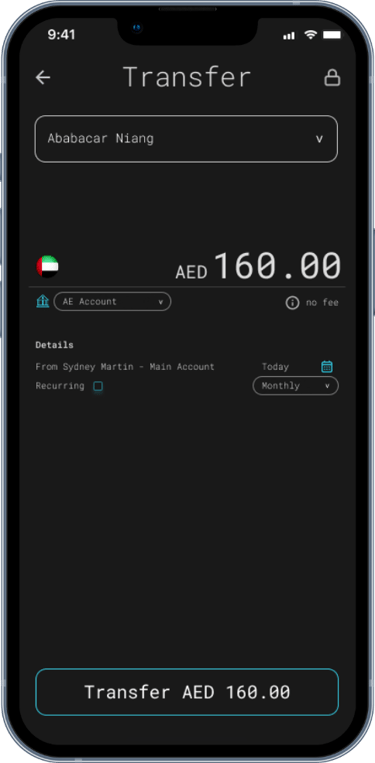
See the beneficiary, currency, amount, and reference together.
Check the information before confirming the transfer.
Keep a clear record for future follow-up.
Review the Payment Details Before You Send
> Conclusion
A payment reference may occupy only one line of a transfer form, but it can determine whether the recipient recognizes the money automatically or must investigate it manually.
Begin by identifying the exact reference requested. Enter it without unnecessary changes, make sure it appears in the correct field, and verify it together with the beneficiary details, currency, amount, and deadline.
After sending, save the payment instructions and transaction receipt. If the transfer is not allocated correctly, those records can help the recipient or payment provider trace it without immediately creating a duplicate payment.
These actions may reduce preventable transfer delays. However, international payments still move through fragmented banking systems, different message formats, multiple intermediaries, and institution-specific reconciliation processes. Those differences continue to create complexity when money crosses borders.
> Related reads
Why Your Transfer Stays “Pending” for Days
Explains how missing information, processing stages, and additional checks can interrupt a transfer.
Why Bank Transfers Have No Clear Status
Explains why payment-status labels differ and why “completed” may not always mean the recipient has received or processed the funds.
How to Reduce Banking Delays
Provides broader guidance on keeping records current, preparing information, and responding quickly to additional requests.
How to Reduce the Risk of Bank Account Restrictions When Living Abroad
Your bank account should support your life abroad—not become another source of uncertainty.
______________________________________________________________________________________________________________________________________________________
by BANKEAZ
On demand banking services for all


______________________________________________________________________________________________________________________________________________________
Learn more about Expat Banking

Global lives deserve simpler banking.





Download the BANKEAZ app for a 100% mobile banking experience. Available on iOS and Android - public testing by invitation.
Bankeaz is designed for people living between countries. Availability may vary depending on the user’s jurisdiction of residence.
The Bankeaz app is developed by Arcadia, a company currently being incorporated in Switzerland.
Bankeaz does not provide banking services in its own name. Financial services are provided by licensed and regulated partner institutions, in accordance with applicable laws and regulations.
Copyright © 2026 - Arcadia | Bankeaz - All rights reserved
Address
____________________






__________________________________________________________________________________________________________________________________________________


(- - -) - - - - - - - - - -
Zurich - CH
__________________________________________________________________________________________________________________________________________________
___________________________________________________________________________________________________________________________________________________
__________________________________________________________________________________________________________________________________________________
Learn
____________________